Applies to DataGrid, DataGridRow and DataGridCell. Two halves: a few properties for the look of the grid, and a set for styling the columns WPF generates for you.
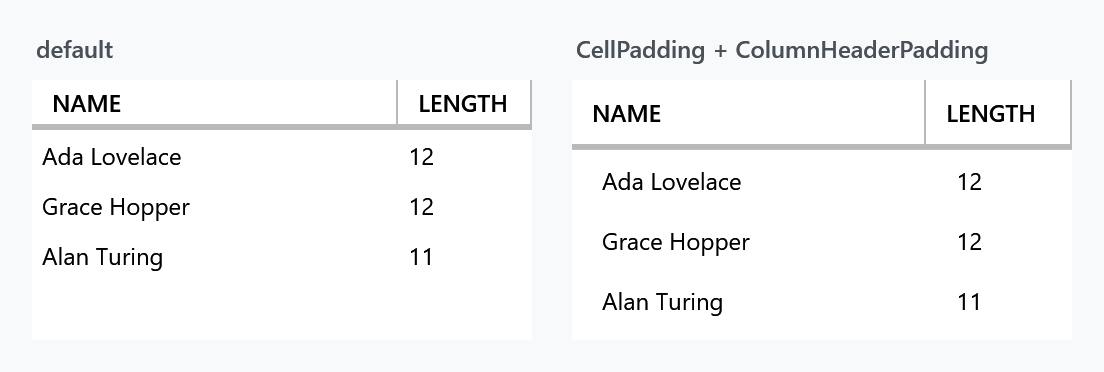
Layout and behaviour
| Property | Type | Default | |
|---|---|---|---|
CellPadding |
Thickness |
0 |
padding inside every cell |
ColumnHeaderPadding |
Thickness |
10 0 4 0 |
padding inside every column header |
SelectionUnit |
DataGridSelectionUnit |
FullRow |
which unit the MahApps styles draw as selected |
EnableCellEditAssist |
bool |
false |
a click straight onto a cell's editing control uses it right away |
<DataGrid mah:DataGridHelper.CellPadding="10 6"
          mah:DataGridHelper.ColumnHeaderPadding="10 8" />
EnableCellEditAssist is the one that changes how the grid feels. It hooks PreviewMouseLeftButtonDown and, when the click landed directly on a cell's editing control, puts the cell into edit mode and passes the click on — so a check box column toggles on the first click instead of needing one to select the cell and another to hit the box. Read-only cells are left alone.
DataGridHelper.SelectionUnit is not DataGrid.SelectionUnit. The MahApps cell and row styles read the attached one to decide what to highlight; WPF's own property still decides what selection actually does. Set both when you change it.
The first column on screen
| Property | Type | Default | |
|---|---|---|---|
TracksFirstVisibleColumn |
bool |
false |
the grid marks the column that is first on screen |
IsFirstVisibleColumn |
bool |
false |
read only, on a DataGridColumn: whether it is that column |
A header style knows its place only by DisplayIndex, and a first column that is collapsed still has 0, so the header after it cannot tell that it now stands first. With TracksFirstVisibleColumn on the grid, the grid follows its columns as they are added, moved, shown and hidden, and marks the one in front. MahApps.Styles.DataGrid.WinUI turns it on, so its first header draws no line on its left.
Both properties are new on develop and not in 2.4.11.
Styling auto-generated columns
AutoGenerateColumns="True" builds columns from the bound type, which leaves nowhere to hang a style. These properties give the generated columns one, in pairs — a display style and an editing style:
| Column type | Display | Editing |
|---|---|---|
DataGridCheckBoxColumn |
AutoGeneratedCheckBoxColumnStyle |
AutoGeneratedCheckBoxColumnEditingStyle |
DataGridTextColumn |
AutoGeneratedTextColumnStyle |
AutoGeneratedTextColumnEditingStyle |
DataGridComboBoxColumn |
AutoGeneratedComboBoxColumnStyle |
AutoGeneratedComboBoxColumnEditingStyle |
DataGridNumericUpDownColumn |
AutoGeneratedNumericUpDownColumnStyle |
AutoGeneratedNumericUpDownColumnEditingStyle |
DataGridDecimalUpDownColumn |
AutoGeneratedDecimalUpDownColumnStyle |
AutoGeneratedDecimalUpDownColumnEditingStyle |
DataGridIntegerUpDownColumn |
AutoGeneratedIntegerUpDownColumnStyle |
AutoGeneratedIntegerUpDownColumnEditingStyle |
DataGridLongUpDownColumn |
AutoGeneratedLongUpDownColumnStyle |
AutoGeneratedLongUpDownColumnEditingStyle |
DataGridHyperlinkColumn |
AutoGeneratedHyperlinkColumnStyle |
AutoGeneratedHyperlinkColumnEditingStyle |
The three typed up-down rows are new on develop. 2.4.11 has the five above them and one numeric column, which is double. See DataGrid columns.
<DataGrid AutoGenerateColumns="True"
          mah:DataGridHelper.AutoGeneratedTextColumnStyle="{StaticResource RightAlignedCell}" />
ColumnStylesHelper takes an IDataGridColumnStylesHelper and does the same job for cases the ten properties above do not cover — it is handed each generated column and can decide what to apply.