MetroTabControl looks like a styled TabControl and adds three things: a close button per tab, a say in whether tab contents survive a switch, and a margin for the strip.
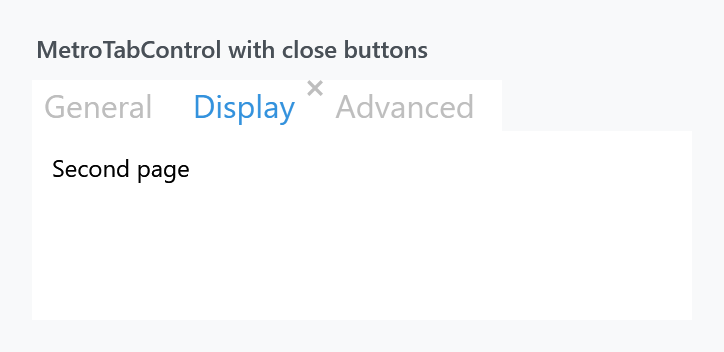
<mah:MetroTabControl>
    <mah:MetroTabItem Header="General" CloseButtonEnabled="True">
        <TextBlock Margin="10" Text="First page" />
    </mah:MetroTabItem>
    <mah:MetroTabItem Header="Display" CloseButtonEnabled="True">
        <TextBlock Margin="10" Text="Second page" />
    </mah:MetroTabItem>
</mah:MetroTabControl>
Its style is based on MahApps.Styles.TabControl, so everything on the TabControl styles page applies: the placement triggers, the underline through TabControlHelper, the large header font. On develop it has the two WinUI looks as well, under MahApps.Styles.MetroTabControl.WinUI and MahApps.Styles.MetroTabControl.WinUI.SelectorBar, each keeping the template this control brings.
Bind ItemsSource and you do not have to make the items yourself — GetContainerForItemOverride hands back a MetroTabItem, not a plain TabItem, so the close button is available either way.
Keeping the visual tree
| Property | Type | Default | |
|---|---|---|---|
KeepVisualTreeInMemoryWhenChangingTabs |
bool |
False |
keep every tab's content alive instead of rebuilding it |
This is the property worth knowing about, and it works by swapping the template outright:
| template | what the content is | |
|---|---|---|
False |
MahApps.Templates.MetroTabControl.DoNotKeepVisualTreeInMemory |
a ContentPresenter bound to SelectedContent, as WPF does it — the old page is discarded on every switch |
True |
MahApps.Templates.MetroTabControl.KeepVisualTreeInMemory |
a PART_ItemsHolder that the TabControlEx base fills with one container per tab and shows or hides |
<mah:MetroTabControl KeepVisualTreeInMemoryWhenChangingTabs="True" />
Turn it on when rebuilding a page is expensive or throws away state — a half-filled form, a scroll position, a loaded document, a WebView. Leave it off when the tabs are many or heavy, because every one of them then stays realised for the lifetime of the control.
MetroTabControl derives from TabControlEx (ControlzEx), which is where the holder mechanism comes from. Note that it is the template that decides: a template of your own without PART_ItemsHolder will not keep anything, whatever the property says.
Closing tabs
A tab goes only when everyone who was asked agrees. Once a close button is clicked:
- the item's own
CloseTabCommand, if it has one, is asked whether it can run. ANokeeps the tab and ends it there; aYesruns the command. See MetroTabItem. - the closing event is raised, and any handler can say no.
- the control's
CloseTabCommand, if it has one, is asked and run. The removal is then whoever handles it to do. - with no command on the control, the item is taken out: of
Itemswhen there is noItemsSource, of the bound collection otherwise, matching either the container or itsDataContext.
Steps 1 and 2 are new on develop. In 2.4.11 a command that answered No still lost its tab, and a CloseTabCommand on the control meant the closing event was never raised at all. Both are fixed, which also means a handler that cancels now stops a CloseTabCommand on the control as well.
Saying no
| Event | |
|---|---|
TabItemClosing |
raised before the tab goes |
TabItemClosingEvent |
the same event under the name it was given first; both are raised, this one before the other |
private void OnTabItemClosing(object sender, BaseMetroTabControl.TabItemClosingEventArgs e)
{
    if (e.ClosingTabItem.Header.ToString() == "Home")
    {
        e.Cancel = true;
    }
}
<mah:MetroTabControl TabItemClosing="OnTabItemClosing" />
TabItemClosingEventArgs derives from CancelEventArgs, so e.Cancel = true keeps the tab where it is. Every handler is given args of its own and the first one to cancel is the last one asked.
Taking your time over the answer
A handler that has to ask somebody before it answers asks for a deferral first. The closing waits for it, so the answer can arrive after a dialog, a save or a call over the wire, and the handler can be async.
private async void OnTabItemClosing(object sender, BaseMetroTabControl.TabItemClosingEventArgs e)
{
    using var deferral = e.GetDeferral();

    var answer = await this.ShowMessageAsync("Close this tab?",
                                             "What is in it has not been saved.",
                                             MessageDialogStyle.AffirmativeAndNegative);

    e.Cancel = answer != MessageDialogResult.Affirmative;
}
GetDeferral hands back a TabItemClosingDeferral, and the closing goes on once it is completed. A using declaration completes it when the handler returns, which is what the example relies on; Complete() does it by hand, and saying it twice does nothing.
A deferral that is never completed leaves the tab where it is for good. Take one inside a using, or complete it in a finally.
Nothing changes for a handler that does not ask for one. With no deferral taken the whole thing stays synchronous, exactly as it was.
TabItemClosing, the deferral and the veto are on develop and ship with the next release. In 2.4.11 there is TabItemClosingEvent alone, and it has to answer on the spot.
The command on the control
| Property | Type | |
|---|---|---|
CloseTabCommand |
ICommand |
run instead of removing the tab |
<mah:MetroTabControl CloseTabCommand="{Binding CloseDocumentCommand}" />
The parameter is the item's CloseTabCommandParameter if it has one, otherwise the MetroTabItem itself.
When this command is set the control does not remove the tab. It runs the command and stops, so taking the item out is yours to do. What changed on develop is that the closing event is raised before the command, and a handler that cancels keeps the command from running at all.
TabStripMargin
| Property | Type | Default | |
|---|---|---|---|
TabStripMargin |
Thickness |
0 |
margin around the header strip |
Room around the tabs without moving the content — useful when the strip shares a row with something of your own, such as a "new tab" button.
The animated siblings
Two more controls share the same base, BaseMetroTabControl, and therefore the same closing behaviour, TabStripMargin and item type:
| Control | |
|---|---|
MetroAnimatedTabControl |
fades the page in when the tab changes |
MetroAnimatedSingleRowTabControl |
the same, with a strip that scrolls rather than wraps |
They are separate controls, not styles. The equivalents for a plain TabControl are MahApps.Styles.TabControl.Animated and MahApps.Styles.TabControl.AnimatedSingleRow — see TabControl.
Neither of those two exposes KeepVisualTreeInMemoryWhenChangingTabs; it is declared on MetroTabControl itself.