MetroNavigationWindow is WPF's NavigationWindow rebuilt on top of MetroWindow: a window with a back/forward bar, a page title, and a Frame that hosts navigated Pages.
<mah:MetroNavigationWindow x:Class="MyApp.MainWindow"
                           xmlns:mah="http://metro.mahapps.com/winfx/xaml/controls"
                           Title="MahApps" />
this.Navigate(new OverviewPage());
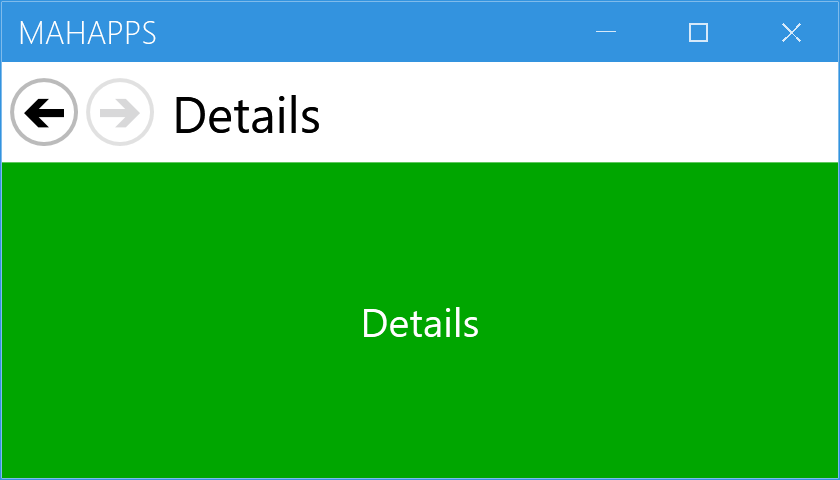
The bar above the content is part of the window, not something you add. The title next to the buttons is the navigated Page.Title, and the two circle buttons enable themselves from CanGoBack and CanGoForward — in the figure the window has navigated twice, so back is live and forward is not.
Unlike almost every other control in the library, this one is compiled XAML, not a ControlTemplate. MetroNavigationWindow.xaml is a MetroWindow subclass with the bar laid out inside it, so there is no template to override and no way to restyle or rearrange the buttons. It also means the window cannot be the root of a XAML file of your own: <mah:MetroNavigationWindow x:Class="…"> is turned down by the compiler with MC6017, since a type that was itself defined in XAML cannot be subclassed in XAML. Build the window in code and keep the markup for the pages. Everything a MetroWindow offers — GlowColor, WindowTitleBrush, flyouts, the window commands — still applies, because it is one.
Navigating
The API mirrors NavigationWindow, and every call is forwarded to the internal Frame:
Navigate(object) / Navigate(Uri) |
with (…, object extraData) overloads for each |
GoBack() / GoForward() |
|
CanGoBack / CanGoForward |
|
BackStack / ForwardStack |
the journal, as IEnumerable |
AddBackEntry(CustomContentState) / RemoveBackEntry() |
|
Source |
the current URI |
NavigationService |
the Frame's own service, if you need the rest of it |
StopLoading() |
All seven of the Frame's navigation events are re-raised on the window, so you can subscribe there instead: Navigating, Navigated, NavigationProgress, NavigationFailed, NavigationStopped, FragmentNavigation and LoadCompleted.
PageContent is a read-only property holding whatever the frame currently shows, updated after every navigation.
Navigate to a Page, not to anything else. Navigate accepts object, but the window's Navigated handler casts the result without checking:
PART_Title.Content = ((Page)PART_Frame.Content).Title;
Navigating to a UserControl, or to a URI whose root is not a Page, therefore throws an InvalidCastException from inside the handler rather than failing gracefully.
This is fixed on develop — the line is now (e.Content as Page)?.Title — so it ships repaired with the next release. Until then, wrap non-Page content in a Page.
The content property is the overlay, not the page
[ContentProperty(nameof(OverlayContent))]
public partial class MetroNavigationWindow : MetroWindow, IUriContext
This catches people out. Child content written inside the window's XAML tags does not become the page — it becomes OverlayContent, which the window draws in a ContentPresenter at Panel.ZIndex="1", on top of the frame:
<mah:MetroNavigationWindow>
    <!--  this is an overlay ON TOP of every page, not the page itself  -->
    <Border Background="#80000000">
        <TextBlock Text="Loading…" Foreground="White" />
    </Border>
</mah:MetroNavigationWindow>
That is useful for a busy indicator or a dimming layer that has to survive navigation, and useless as a way to set the first page. Pages come from Navigate.
The content is hosted in a Frame, and a Frame is a boundary for both property value inheritance and resource lookup. A Page inside it will not see resources you merged into the window's own Resources, nor inherit values like Foreground from the window. Put shared resources in App.xaml instead.
Coming in the next release
develop reworks the navigation bar, and none of this is in 2.4.11:
ShowsNavigationUI |
hides the whole bar when False |
ShowHomeButton |
adds a third, leading Home button |
GoHome() |
navigates back to the first entry and clears the history behind it |
GoHome() removes back entries until one remains and then goes back to it, with the Navigated handler detached while it unwinds so the intermediate steps do not fire events.
Related
MetroWindow for everything the window part can do — this control inherits all of it. Flyout works here as well, since the flyouts live on the MetroWindow.