The Clean variant replaces the accent-coloured window chrome with a white title bar, a centred title and dark buttons. It is the smaller of the library's two window variants: it restyles the window and four other things, and leaves every ordinary control alone.
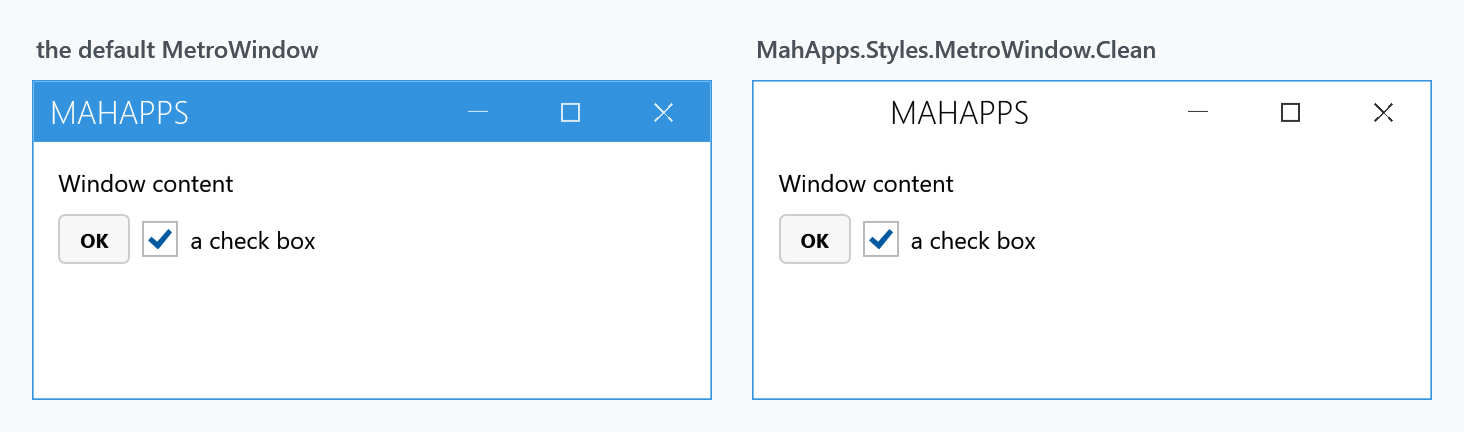
Opting in
Merge the variant's dictionary and set the window's style:
<mah:MetroWindow x:Class="MyApp.MainWindow"
                 xmlns:mah="http://metro.mahapps.com/winfx/xaml/controls"
                 Style="{DynamicResource MahApps.Styles.MetroWindow.Clean}">
    <mah:MetroWindow.Resources>
        <ResourceDictionary>
            <ResourceDictionary.MergedDictionaries>
                <ResourceDictionary Source="pack://application:,,,/MahApps.Metro;component/Styles/Clean/Controls.xaml" />
            </ResourceDictionary.MergedDictionaries>
        </ResourceDictionary>
    </mah:MetroWindow.Resources>
</mah:MetroWindow>
That is what the demo's CleanWindowDemo does. Clean/Controls.xaml merges the five dictionaries below and declares implicit styles for each of them, so the explicit Style= on the window is belt-and-braces rather than required — but harmless, and clearer about intent.
Merge the dictionary into App.xaml instead if the whole application should use it. Either way Styles/Controls.xaml stays where it is: Clean goes on top of the ordinary style set rather than in place of it, and without it every control outside the table below keeps the plain WPF look.
What it restyles
| Dictionary | Applied to |
|---|---|
Clean/MetroWindow.xaml |
MetroWindow |
Clean/WindowButtonCommands.xaml |
WindowButtonCommands |
Clean/WindowCommands.xaml |
WindowCommands |
Clean/GroupBox.xaml |
GroupBox |
Clean/StatusBar.xaml |
StatusBar |
The keyed styles are MahApps.Styles.MetroWindow.Clean, …WindowButtonCommands.Clean, …WindowCommands.Clean, …GroupBox.Clean, …StatusBar.Clean, plus MahApps.Styles.Separator.Clean and four Button.MetroWindow.*.Clean styles for the title-bar buttons in their light and dark forms.
Clean/Controls.xaml applies MahApps.Styles.WindowButtonCommands.Clean.Win10 to the window buttons — the Clean variant borrows the Win10 button look rather than defining its own.
Notice what is not in that list: buttons, text boxes, check boxes, lists, tabs. Clean is a window-chrome variant. If you want it to change more, it is a starting point to extend rather than a full theme.
Related
Visual Studio is the other window variant and a much broader one. Win10 and WinUI are a different kind of thing: whole style sets you merge in place of Controls.xaml, rather than chrome on top of it.